REVIEW · NEW YORK CITY
An Epic Scavenger Hunt: New York City Central Park Adventure
Book on Viator →Operated by Let's Roam · Bookable on Viator
Central Park works best when you have a reason to look closer. This app-led scavenger hunt turns a casual stroll into a self-guided adventure with landmark stops, quick questions, and group photo games. I like the built-in photo challenges that give everyone a role, and I like that the route bounces between well-known park sights without you needing to plan anything. The main drawback is that the whole thing runs through your phone, so if the app starts slowly or you’re not sure where to meet, you can lose time fast.
You can start whenever you want within the day and take it at your own pace. The hunt is designed for a 1.5 to 2 hour walk, with interactive prompts delivered in the app as you reach each checkpoint. If your group isn’t comfortable using a smartphone for navigation and tasks, plan for extra time and patience before you start.
In This Review
- Key points if you want the fast version
- How the Central Park hunt actually works (no tour guide required)
- Price and value for a 1.5–2 hour park game
- Stop-by-stop: your route through Central Park’s landmarks
- Stop 1: Swedish Cottage Marionette Theatre
- Stop 2: Alice in Wonderland statue
- Stop 3: The Dakota
- Stop 4: Belvedere Castle
- Stop 5: Bethesda Fountain
- Stop 6: Strawberry Fields
- Stop 7: Balto statue
- Stop 8: Central Park (final checkpoint)
- What you’ll do: questions, plaques, and texted photo challenges
- Central Park basics you should plan for before you start
- Who this private hunt is best for (and who might be frustrated)
- The main catch: app reliability and finding the starting point
- Should you book this Central Park scavenger hunt?
- FAQ
- How long is the Central Park scavenger hunt?
- Where do we meet for the adventure?
- Can we start at any time?
- Do I need to download an app?
- What’s included with the ticket price?
- What’s not included?
- Is this experience private?
- Is there a minimum age requirement?
- Can I cancel for a full refund?
- Is the experience outdoors and how should I dress?
Key points if you want the fast version
- Start on your schedule: you can begin at any time you wish for a self-guided run
- Landmark checkpoints: Swedish Cottage Marionette Theatre, Alice in Wonderland statue, The Dakota, and more
- Photo challenges with points: each person takes an active role and earns scores for good shots
- App-led navigation: the Let’s Roam app guides you and delivers the activities
- Simple ticket value: you’re paying for app access, not park admissions or food
How the Central Park hunt actually works (no tour guide required)

This is a private, self-guided experience for just your group, not a shared walking tour with a guide. Your “guide” is the Let’s Roam app. After you buy the mobile ticket, you download the app, register, and redeem your tickets there to unlock your hunt.
Once you start, the app guides you through the route and tells you what to do at each stop. The big idea is that you’re not just sightseeing. You’re hunting for answers that are meant to be found in person—on plaques, statues, and other park details—plus completing short activities and photo prompts along the way.
Timing is flexible, but not endless. The experience runs about 1.5 to 2 hours, and you’ll want enough battery and attention to keep moving.
You can also read our reviews of more city tours in New York City



Price and value for a 1.5–2 hour park game

At $14.99 per person, this can be a good value if you want an organized game rather than a plain walk. The price buys you app access and the hunt experience itself.
Here’s what’s not included, and why it matters: parking costs, any entrance fees to paid spaces, food, and transportation are on you. So if your plan includes museum tickets or paid attractions, you should budget separately. Likewise, if your group needs coffee or snacks mid-hunt, build in time for that.
The hunt is also a “smartphone tax” type of experience: it depends on a working device. The app-led format can be great when it works, but it changes what you’re paying for. You’re paying less for logistics (no guide coordination) and more for the convenience of an interactive app.
Stop-by-stop: your route through Central Park’s landmarks

The route uses eight checkpoints, starting and ending at the same meeting spot area. Even if you don’t know the park well, the stops help you keep your bearings and create a natural walking loop.
At every stop, your job stays similar: follow the app to the right place, answer what you’re asked to find there, and often do a quick photo-related task with your group.
Stop 1: Swedish Cottage Marionette Theatre
This is where your hunt begins at 72 E 72nd St, New York, NY 10021. Expect your first tasks to get you moving quickly—think setup, first clue reading, and an early photo prompt to set the tone.
Why it’s a good opener: it gives you a clear start location, so you can test your phone and group coordination right away. If your device struggles at the very beginning, you’ll learn that before you’re halfway through the route.
Possible drawback: because it’s the first stop, it can reveal any confusion early. If your group is arriving late or trying to find the exact starting area, you’ll want a buffer.
Stop 2: Alice in Wonderland statue
This checkpoint shifts the mood into something more playful. You’ll likely get an instruction that pushes you to notice details around the sculpture and then complete a short activity.
What to aim for here: don’t rush. Take the minute to line up your photo prompt, because “best shot” challenges tend to reward doing one careful take rather than a frantic burst.
Likely time-sink: if the group argues about which photo is best, it can slow the pace. Build in a light system—one person decides, others help choose the angle.





Stop 3: The Dakota
By the time you hit this stop, the hunt rhythm is set: walk, find, answer, do the prompt. This is a checkpoint meant to keep you looking around rather than just crossing the park.
For your group: this is a good moment for coworkers or family members to trade roles. Since each person has an interactive role, it helps to rotate who’s reading and who’s taking photos.
Possible drawback: if your phone’s screen brightness is low or you’re relying on poor reception, this is where you’ll feel it. Keep your device accessible and your app running.
Stop 4: Belvedere Castle
This stop adds a different park vibe, and it’s another place where the app-driven question design matters. Instead of turning your sightseeing into a self-planning project, the hunt gives you the reason to stop and look.
What makes it work: each checkpoint keeps the walking route structured, so you’re not guessing. You just follow the next direction and focus on the task.
Possible drawback: if you have a slower group member, this stop can become a pause point. The fix is simple: let the app guide where to wait, then all regroup quickly for the clue and photo.
Stop 5: Bethesda Fountain
Now you’re deep enough into the route that your group’s “game” mode usually kicks in. Photo challenges work best when people are relaxed enough to try again if the first photo doesn’t score well.
How I’d handle it with a mixed-age group: keep the walking pace steady and treat the photo prompt as optional takes. If you try for perfection every time, the 1.5–2 hour plan can slip.
Possible drawback: timing can drift if the app prompts take longer than expected at this checkpoint. Save energy by deciding your group’s photo strategy early.
Stop 6: Strawberry Fields
This checkpoint keeps the hunt moving toward one of the most memorable areas in Central Park. The app uses this type of landmark moment to make the task feel like a mini mission, not paperwork.
What you’ll get: more chances to earn points through photos and to use what you’ve learned from earlier stops to move faster through clues.
Possible drawback: if your group stops for sightseeing beyond the app tasks, you can run long. The hunt works best when you stay mission-focused and let extra wandering happen after the hunt ends.
Stop 7: Balto statue
This is another sculpture-focused stop in the sequence. These are designed for close-up attention, which is where the hunt does its best work—encouraging you to notice details rather than just walk past them.
Photo challenge angle: statues can be great subjects, but they also tempt people to take the same wide shot repeatedly. Try a close crop or a different perspective to vary your entry.
Possible drawback: you may need to coordinate where everyone stands for photos. If your group is large, agree on “one step to the left” rules so nobody blocks the line.
Stop 8: Central Park (final checkpoint)
The final stop wraps up the route and brings you back toward the end point logic. The activity ends back at the meeting point, so the hunt functions like a loop.
How to end it well: don’t let the “last clue” become a rushed scramble. Finish the tasks, grab your last points, and then decide whether you want to continue wandering on your own.
What you’ll do: questions, plaques, and texted photo challenges
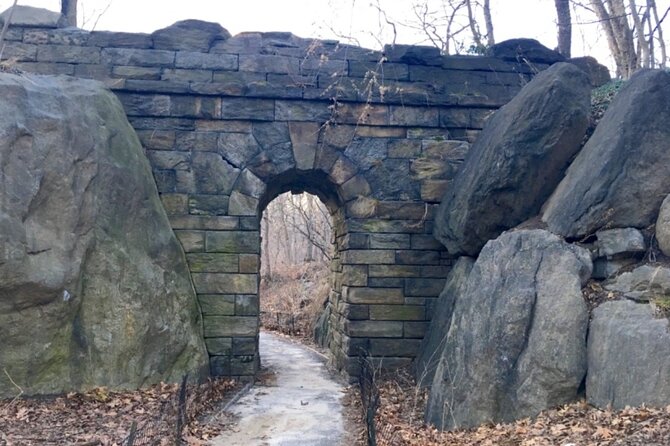
The hunt is built around in-person discovery. Instead of trivia you can read at home, you answer questions found on location—plaques, statues, and visible park details. That’s where the experience turns from entertainment into a walk that teaches you how to look.
On top of the clue-finding, each person gets interactive involvement through the app. You’ll get texted photo challenges and fun activities during the run, and you earn points for the best photos.
Why this is valuable: it turns a “who’s driving the conversation?” problem into something built-in. People don’t have to invent games. The hunt does that for you, and it gives quieter folks an easy way to participate.
The other benefit is pacing. When the app gives you the next task, you don’t need constant group decision-making about where to go next.
Central Park basics you should plan for before you start
A self-guided park activity can feel easy—until small things cause big delays. This one has three practical needs.
First, comfortable walking shoes. You’ll be moving for roughly 1.5 to 2 hours.
Second, your phone battery. You should make sure your smartphone is fully charged before the tour because you’ll use it to navigate and interact with the app. Bring a power bank if you need one.
Third, weather. Check the forecast and dress appropriately. The route is outdoors, so you’ll want layers that work with your group’s walking pace.
If you’re coming with a mixed group, I recommend a simple plan: one person is the “device manager,” one is the “timekeeper,” and everyone else does the fun part—finding, answering, and snapping photos.
Who this private hunt is best for (and who might be frustrated)
This works best for coworker groups and families who want a private activity in Central Park without booking a guide. Because it’s only your group, you control the tone. It’s also easy to scale: each person gets a role, and the app keeps everyone involved.
It also fits people who like structure. Even if you’re self-guided, you’re not improvising the whole route.
The physical requirement is listed as moderate. No minimum age is required, which means it can work for multigenerational groups, as long as everyone can handle the walking and time outdoors.
One more note: service animals are allowed. And it’s near public transportation, which can help if you don’t want to deal with parking.
The main catch: app reliability and finding the starting point
This experience lives and dies by your smartphone experience. One clear lesson from the feedback style around this kind of app-led activity is that you should not treat setup like an afterthought.
If you want this to go smoothly:
- Arrive early so you can find 72 E 72nd St without stress
- Make sure the app is installed and your ticket is redeemed before your start window
- Keep the screen brightness up and don’t switch to low-power modes mid-hunt
- If you hit a snag, use customer service support listed for the experience
Also, because the start location matters and the hunt is timed by your flow, don’t plan to “start whenever you figure it out.” Plan to start when your group is ready.
Should you book this Central Park scavenger hunt?
Book it if you want Central Park to feel like a team game, with built-in photo challenges and checkpoint variety. At $14.99 per person, it’s especially good value when your group wants an easy plan that doesn’t require guide coordination or reservation calls.
Skip or reconsider if your group hates app-based instructions, struggles with phone navigation, or expects a traditional guided experience with lots of human direction. In that case, the hunt can feel frustrating instead of fun.
If you’re the organizer, do a quick preflight: charged phone, power bank if needed, and arriving at the meeting spot early. Do that, and this hunt can turn a famous park into a surprisingly personal adventure.
FAQ
How long is the Central Park scavenger hunt?
It takes about 1 hour 30 minutes on average, with each hunt listed as 1.5 to 2 hours.
Where do we meet for the adventure?
The meeting point is 72 E 72nd St, New York, NY 10021, USA.
Can we start at any time?
Yes. This is self-guided, so you can start at any time you wish. It’s meant to be app-led rather than scheduled with a guide.
Do I need to download an app?
Yes. You’ll download the Let’s Roam app, register, and redeem your tickets there to start the hunt.
What’s included with the ticket price?
You get Let’s Roam app access.
What’s not included?
Parking and parking fees, admission tickets to entrances, food and beverages, personal expenses, transportation costs, and any additional paid attractions or activities are not included.
Is this experience private?
Yes. It’s listed as a private tour/activity, so only your group participates.
Is there a minimum age requirement?
No minimum age is required.
Can I cancel for a full refund?
You can cancel for a full refund if you cancel at least 24 hours in advance of the experience’s start time.
Is the experience outdoors and how should I dress?
It’s an outdoor park activity, so you should check the weather forecast and dress appropriately. Comfortable shoes are recommended.